📝 Registration Cards That Collect Exactly What You Need
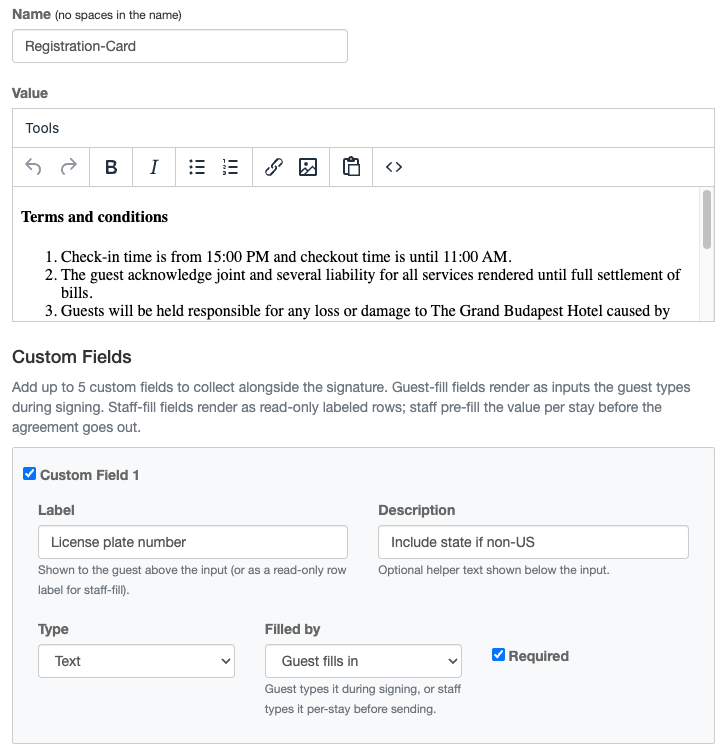
Every property has details the standard registration card doesn't capture — a vehicle plate, an emergency contact, an agreed deposit. Agreement Custom Fields let you add up to 5 of your own fields to any agreement template, so the signed document collects exactly what your operation needs.
Guest-fill fields: The guest types the value while signing — vehicle plate, arrival time, emergency contact.
Staff-fill fields: Your team pre-fills the value for each reservation — rate, deposit, room number — and the guest sees it read-only on the signed document.
A permanent record: Each signed copy stores a snapshot of the labels and answers at signing time, so template edits never rewrite history. Re-signing creates a fresh record, and every signature for a stay is listed with the template name and date.
👉 Learn more about Agreement Custom Fields →
🔧 Fixes and Improvements
Configure Extra Check-in Fields Yourself
The "Who Is Coming" step of contactless check-in can now collect any extra guest details you need — license plate, estimated arrival, loyalty number — and you configure the fields yourself under Settings > Check-in > Steps > Who Is Coming. Set the label, description, and required flag for up to 6 fields. No support ticket needed.
👉 Set up Extra Guest Fields →Assign Inspectors in Bulk — Round-Robin
In the Auto Assign modal, inspectors are now a checkbox multi-select with Select All. Pick several and HelloShift distributes the rooms across them evenly, round-robin — no more assigning inspections one room at a time. A new Task filter on the Assignments page helps you narrow the list, too.
👉 See Room Assignments →Block Prank & Spam Numbers
Block a guest from the profile menu (or in bulk) and every inbound message — SMS, WhatsApp, Messenger, web widget — is silently dropped. Blocked guests are hidden from your default views but stay searchable in case you want to unblock them later.
👉 Learn about blocking guests →One-Click Check on Your Voice AI Setup
Click Analyze Voice Config on the Voice > Customization tab and HelloShift reviews your FAQs, Service Policies, and custom instructions for conflicts — returning severity-ranked findings with suggested fixes, right on the page.
👉 Voice AI configuration →