🌍 Speak Every Guest's Language, Automatically
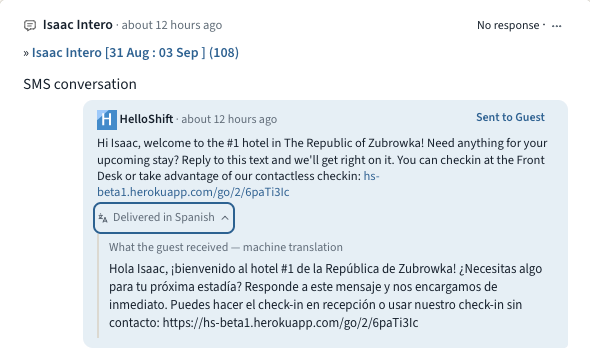
Some of your guests would rather not do everything in English. They book anyway, get a confirmation text they half understand, and end up calling the front desk. Multilingual Guest Messaging closes that gap. HelloShift learns each guest's language from their messages, calls, and check-in, keeps every conversation readable for your team in English, and with one checkbox sends your automated messages in the guest's own language.
Read every message: When a guest writes in another language, the message translates automatically in the Inbox. Translations are clearly labeled, you can always tap "Show original", and once a message is translated everyone on your team sees it.
Guest pages follow the guest: Online check-in, the guidebook, shop, and tipping pages all show up in the guest's language, and guests can switch languages at the top of check-in or the guidebook. HelloShift remembers the choice on the guest record. It even shapes how the Voice AI assistant greets returning callers.
Automated messages, translated: Tick Translate automated messages into the guest's language under Admin > Settings > Guest > Messaging and every automated and triggered message goes out in the guest's language: pre-stay, in-stay, key codes, and event triggers. Your team still sees the English original with a "Delivered in Spanish" line underneath, and you can review and correct every translation on its snippet.
👉 Learn more about guest languages →
🔧 Fixes and Improvements
AI Insights, now on for every property
AI Insights is now enabled for every property, and the daily report email has been rebuilt to match. The subject line carries the day's headline, the body reads like the report itself with KPIs, sections, and the narrative, and it renders properly on a phone. On the reports page, the Copy for morning meeting button turns the day's numbers into a paste-ready briefing.
👉 Email reports →
Tokeet (AdvanceCM) rentals, connected to your AI front desk
Running rentals on Tokeet or AdvanceCM? Our new certified integration connects your account in minutes. Authorize once under ADMIN > Site Settings > Integrations and your rentals plus upcoming bookings import automatically and stay current. Guest names, phones, and emails arrive ready for messaging, and arrivals, departures, and guest status feed your AI front desk, guest messaging, and housekeeping checklists. The sync is one-way by design: bookings flow in, while cleaning status and payments stay in Tokeet.
👉 Set up the Tokeet (AdvanceCM) integration →
Every automated message, backed up by email
A confirmation text lands, the guest skims it, and three days later they're hunting for the check-in link. Tick Send an email copy of every automated message under Admin > Settings > Guest > Messaging and every automated or triggered SMS or WhatsApp message is also emailed at the same moment, whenever the guest has an email on file. Messages that already went out by email are never sent twice, and every copy shows in the guest's conversation.
👉 Learn more about the email copy →
Undeliverable texts move to the next channel automatically
Sometimes a text just can't be delivered: a wrong digit, a landline, a WhatsApp number that was never registered. When that happens, HelloShift now re-sends the message on the next channel in your Order of Channels instead of leaving the guest unreached. Both the failed attempt and the re-send show in the guest's conversation.
👉 Order of Channels →