September 1st, 2026
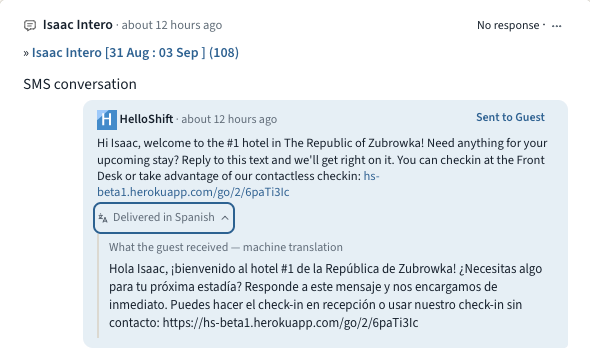
Some of your guests would rather not do everything in English. They book anyway, get a confirmation text they half understand, and end up calling the front desk. Multilingual Guest Messaging closes that gap. HelloShift learns each guest's language from their messages, calls, and check-in, keeps every conversation readable for your team in English, and with one checkbox sends your automated messages in the guest's own language.
Read every message: When a guest writes in another language, the message translates automatically in the Inbox. Translations are clearly labeled, you can always tap "Show original", and once a message is translated everyone on your team sees it.
Guest pages follow the guest: Online check-in, the guidebook, shop, and tipping pages all show up in the guest's language, and guests can switch languages at the top of check-in or the guidebook. HelloShift remembers the choice on the guest record. It even shapes how the Voice AI assistant greets returning callers.
Automated messages, translated: Tick Translate automated messages into the guest's language under Admin > Settings > Guest > Messaging and every automated and triggered message goes out in the guest's language: pre-stay, in-stay, key codes, and event triggers. Your team still sees the English original with a "Delivered in Spanish" line underneath, and you can review and correct every translation on its snippet.
👉 Learn more about guest languages →
🔧 Fixes and Improvements
AI Insights, now on for every property
AI Insights is now enabled for every property, and the daily report email has been rebuilt to match. The subject line carries the day's headline, the body reads like the report itself with KPIs, sections, and the narrative, and it renders properly on a phone. On the reports page, the Copy for morning meeting button turns the day's numbers into a paste-ready briefing.
👉 Email reports →
Tokeet (AdvanceCM) rentals, connected to your AI front desk
Running rentals on Tokeet or AdvanceCM? Our new certified integration connects your account in minutes. Authorize once under ADMIN > Site Settings > Integrations and your rentals plus upcoming bookings import automatically and stay current. Guest names, phones, and emails arrive ready for messaging, and arrivals, departures, and guest status feed your AI front desk, guest messaging, and housekeeping checklists. The sync is one-way by design: bookings flow in, while cleaning status and payments stay in Tokeet.
👉 Set up the Tokeet (AdvanceCM) integration →
Every automated message, backed up by email
A confirmation text lands, the guest skims it, and three days later they're hunting for the check-in link. Tick Send an email copy of every automated message under Admin > Settings > Guest > Messaging and every automated or triggered SMS or WhatsApp message is also emailed at the same moment, whenever the guest has an email on file. Messages that already went out by email are never sent twice, and every copy shows in the guest's conversation.
👉 Learn more about the email copy →
Undeliverable texts move to the next channel automatically
Sometimes a text just can't be delivered: a wrong digit, a landline, a WhatsApp number that was never registered. When that happens, HelloShift now re-sends the message on the next channel in your Order of Channels instead of leaving the guest unreached. Both the failed attempt and the re-send show in the guest's conversation.
👉 Order of Channels →
August 1st, 2026
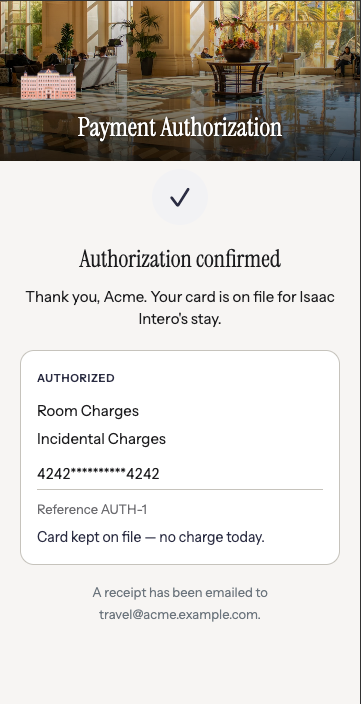
When a parent, employer or travel agent is paying for someone else's room, you email a PDF, wait for it to come back printed, signed and photographed — and it still may not hold up when the charge is disputed. Card Authorization Forms replace that with a link. The cardholder opens it, picks exactly what they're authorizing, enters their card and signs. You get a signed record and a card on file before the guest arrives.
Send it from the reservation: Open a reservation, click Request Card Authorization, choose Card on file (no charge now) or Charge immediately, tick what's covered — room, food & beverage, incidentals, reservation guarantee, or all charges — and the link emails to the cardholder. Links last 7 days, work once, and can be resent any time.
Built for a cardholder who isn't the guest: The form names both parties, so a parent or company can see whose stay they're guaranteeing before they commit — the situation a check-in card was never designed for.
Evidence, not just consent: Each submission is filed with the signature, the masked card, the address and security-code check results, the IP address and the timestamp — the record you want in hand when a charge is disputed. Secure card entry needs Shift4; on other providers the form still captures the signed authorization and your team takes the card as usual.
👉 Learn more about Card Authorization Forms →
Card Authorization Forms are enabled per property — email support@helloshift.com to turn them on for yours.
🔧 Fixes and Improvements
Your registration card answers, now in your messages
Vehicle plate, emergency contact, balance due, party size, special requests — anything your registration card or your PMS already holds can now be dropped into a confirmation text or email automatically. A parking message can name the exact car on file; a balance reminder can quote the exact amount owed. Nobody retypes it, so nobody gets it wrong. Your own field names appear in the variable picker, ready to insert.
👉 Using agreement field values →
Set your own booking link
When a guest asks about staying with you, the AI can text them a link to book, already filled in with the dates they asked about. You can now set that link yourself: go to AI Assistant → Text → General, search any stay on your own booking engine, and paste the link you land on. Tracking codes picked up from your browser are removed automatically.
👉 Set up your booking link →
July 1st, 2026
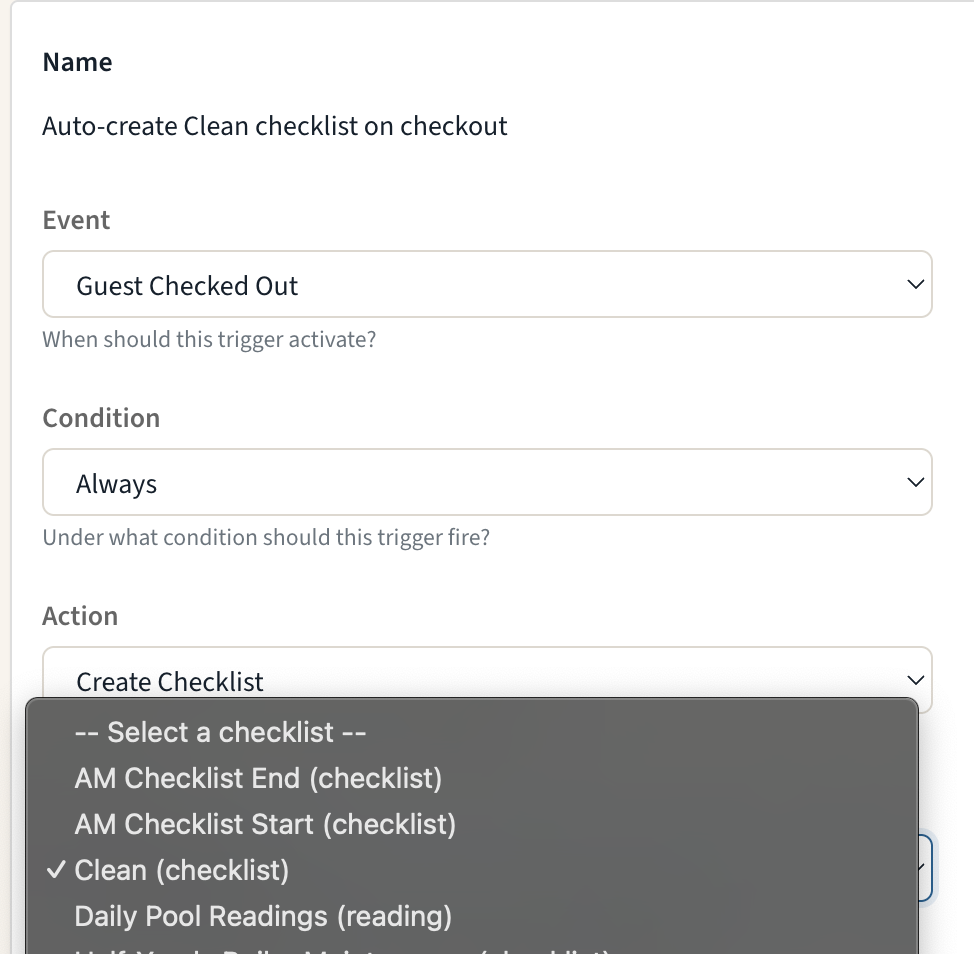
Stop recreating the same work by hand every time a guest arrives or departs. Triggers can now create checklists and tasks: pick a template, pick the moment — check-in, checkout, booking confirmed — and HelloShift generates the work automatically, tagged to the right room and linked to the right guest.
Create Checklist: Generate a checklist from any template the moment an event fires — a checkout-clean checklist for every departing room, ready before housekeeping walks the floor.
Create Task: Create a task (with its subtasks) from a task template, one per room, inheriting the room tag and guest link.
Smart by default: Multi-room reservations get one item per room, repeated PMS events don't create duplicates, and if a template is ever deleted the trigger switches itself off safely instead of failing silently.
👉 Learn more about Checklist & Task actions →
🔧 Fixes and Improvements
Merge Duplicate Guest Records
When the same guest shows up twice — a PMS double-send, a new phone number, a manually created record — admins can now merge the duplicate into the canonical profile right from the guest page. Notes, messages, tasks, stays, and history all move to the keeper, with a side-by-side review before anything is changed.
👉 Learn how to merge guests →OTA Guests Can Use the Kiosk Too
Guests who booked through an OTA can now self-check-in at the kiosk using the confirmation number from their OTA booking email — HelloShift matches it to the PMS reservation automatically on supported PMS integrations.
👉 Kiosk Self-Checkin →Your Cleaning Week, On Your Phone
The mobile app now has a weekly Room Calendar with a My/All filter, so cleaners and supervisors can see the whole week's room assignments at a glance — not just today's.
👉 Room Assignments →Shop, Arranged Your Way
Drag to reorder your shop items — the guest storefront follows your order — and give the store its own banner image under Settings > Brand.
👉 Shopping Feature →
June 1st, 2026
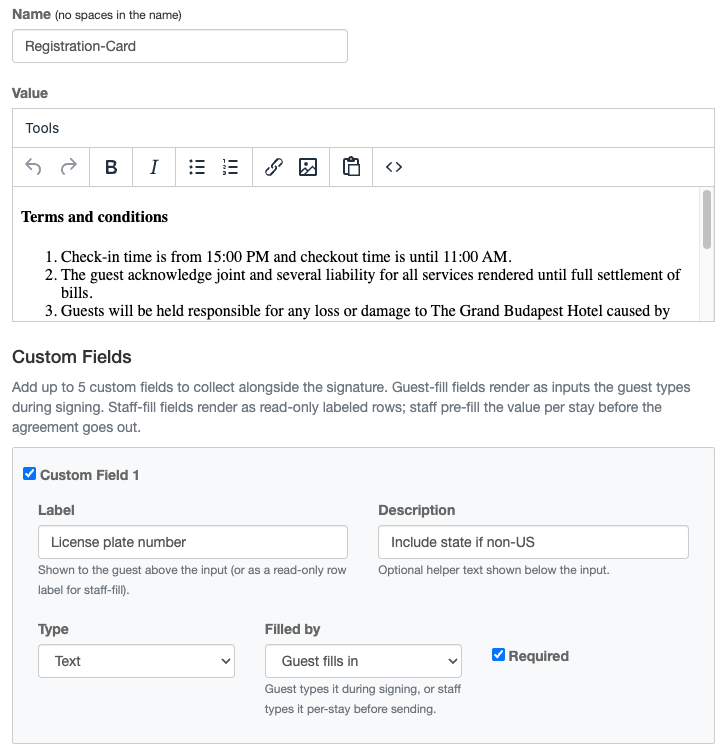
Every property has details the standard registration card doesn't capture — a vehicle plate, an emergency contact, an agreed deposit. Agreement Custom Fields let you add up to 5 of your own fields to any agreement template, so the signed document collects exactly what your operation needs.
Guest-fill fields: The guest types the value while signing — vehicle plate, arrival time, emergency contact.
Staff-fill fields: Your team pre-fills the value for each reservation — rate, deposit, room number — and the guest sees it read-only on the signed document.
A permanent record: Each signed copy stores a snapshot of the labels and answers at signing time, so template edits never rewrite history. Re-signing creates a fresh record, and every signature for a stay is listed with the template name and date.
👉 Learn more about Agreement Custom Fields →
🔧 Fixes and Improvements
Configure Extra Check-in Fields Yourself
The "Who Is Coming" step of contactless check-in can now collect any extra guest details you need — license plate, estimated arrival, loyalty number — and you configure the fields yourself under Settings > Check-in > Steps > Who Is Coming. Set the label, description, and required flag for up to 6 fields. No support ticket needed.
👉 Set up Extra Guest Fields →Assign Inspectors in Bulk — Round-Robin
In the Auto Assign modal, inspectors are now a checkbox multi-select with Select All. Pick several and HelloShift distributes the rooms across them evenly, round-robin — no more assigning inspections one room at a time. A new Task filter on the Assignments page helps you narrow the list, too.
👉 See Room Assignments →Block Prank & Spam Numbers
Block a guest from the profile menu (or in bulk) and every inbound message — SMS, WhatsApp, Messenger, web widget — is silently dropped. Blocked guests are hidden from your default views but stay searchable in case you want to unblock them later.
👉 Learn about blocking guests →One-Click Check on Your Voice AI Setup
Click Analyze Voice Config on the Voice > Customization tab and HelloShift reviews your FAQs, Service Policies, and custom instructions for conflicts — returning severity-ranked findings with suggested fixes, right on the page.
👉 Voice AI configuration →
May 1st, 2026
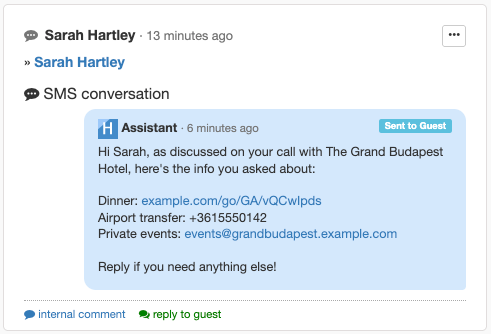
Turn every "do you have a room?" call into a booking opportunity. When guests call to ask about availability, HelloShift Voice AI now checks your PMS in real time, reads back available rates with pricing, and texts a pre-filled booking link — all in one conversation.
Real-time availability: The AI extracts dates and guest count, queries your PMS (Cloudbeds, Mews, Opera), and reads back available room types with pricing on the call.
Frictionless handoff: The guest gets a booking link via SMS pre-filled with their dates and preferences — no spelling, no re-typing, no missed conversions.
Configurable rate logic: Choose which rates the AI quotes (best available, specific plans, or by room type) right from AI Assistant Configuration.
👉 Learn more about Availability & Booking Enquiries →
🔧 Fixes and Improvements
Mark Tasks as Urgent
Escalate any task to the top of every list with a single click. Urgent tasks show a red badge in the sidebar, a red border on tiles, and push immediately to the assignee. Downgrade just as easily once the rush has passed.
👉 Learn about Task Priority →Voice AI Service Hours & Service Policies
Tell the Voice AI exactly when your team is on duty, and how to answer about your restaurant, spa, parking, and other services. Outside service hours, the AI sets expectations ("our team will take care of this at 8 AM") instead of promising immediate action. Service Policies stop the AI from inventing details — give it a link, phone, email, or take-a-message response for each topic, and it sticks to your script.
👉 Configure Service Hours → · Define Service Policies →
April 1st, 2026
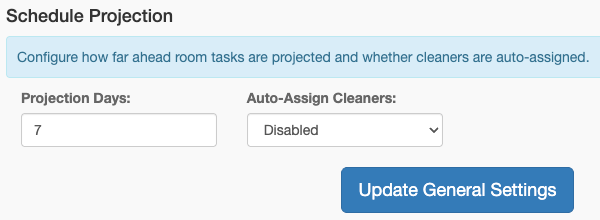
Give your housekeeping team a full week of visibility — before the day even starts. Schedule Projection looks ahead at your room automations and generates cleaning assignments for the next several days, so cleaners, supervisors, and managers know exactly what's coming.
- Plan ahead, not day-of: Room jobs project forward up to 14 days (default 7), so tomorrow's — and next Tuesday's — assignments are ready tonight.
- Respects every rule: Stay-based conditions, per-room schedules, and day-of-week rules are all honored. HelloShift reconciles nightly — adding new assignments, clearing stale ones, and preserving manual overrides.
- Optional auto-assignment: Turn on auto-assign to hand projected tasks to cleaners automatically, balancing workload with the Credit system.
👉 Learn more about Schedule Projection →
🔧 Fixes and Improvements
- PointCentral digital keys integration
Connect your PointCentral account to HelloShift and automate guest room access end-to-end. Issue, extend, and revoke user codes from the reservation, auto-map rooms to PointCentral units, and share codes with guests via SMS, WhatsApp, Email, or Voice.
👉 Set up PointCentral →
March 1st, 2026
Stop chasing data across spreadsheets and systems. HelloShift AI Insights automatically analyzes your property's operations and delivers clear, actionable reports — so you can focus on running your hotel, not compiling numbers.
Automated daily & weekly reports: Get comprehensive operational summaries delivered every morning, covering guest experience, housekeeping, revenue, and more — generated automatically around 6 AM in your property's timezone.
Configurable & customizable: Choose which sections matter most, pick your preferred writing style (detailed, brief, or structured), and add custom instructions tailored to your property.
Email delivery & team access: Team members can opt in to receive reports via email, keeping everyone informed — even when they're away from the dashboard.

👉 Learn more about AI Insights & Reports →
🔧 Fixes and Improvements
AI Task Check-ins
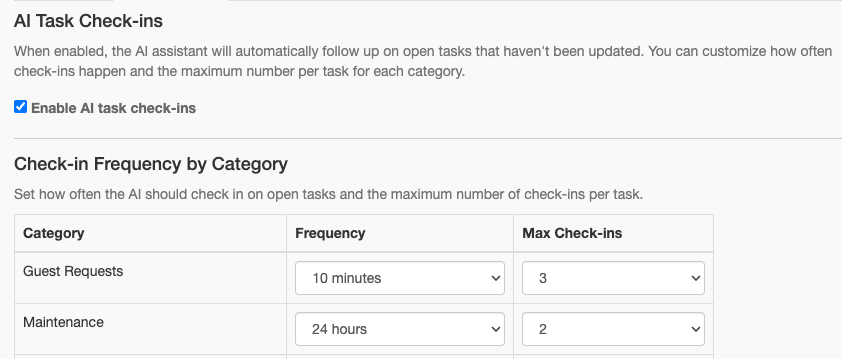
Open tasks now receive intelligent follow-up comments based on their urgency — guest requests are checked every 10 minutes, housekeeping every 30 minutes, and maintenance daily. No more tasks slipping through the cracks.
👉 Learn more about AI Task Check-ins →
February 1st, 2026
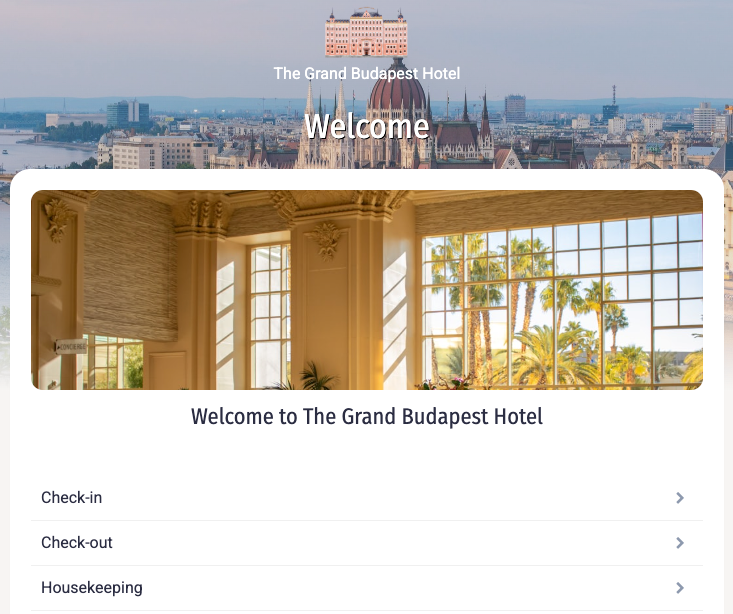
Give every guest a polished digital guidebook — without the busywork. The HelloShift Guest Guidebook has been redesigned from the ground up with a fresh, modern appearance, streamlined editing, and AI auto-generation that creates a great-looking guidebook in seconds.
- AI-powered setup: Generate a complete guidebook from your property details — then adopt, iterate, and make it yours.
- Redesigned appearance: A clean, modern look with customizable cover images, colors, and welcome text that matches your brand.
- Improved editing: Easier page management, drag-and-drop ordering, and a streamlined admin experience.
👉 Learn more about the Guest Guidebook →
🔧 Fixes and Improvements
- rezStream PMS integration
Connect your rezStream PMS to HelloShift with a self-service OAuth flow. Automatically sync guest reservations and room data — no manual setup required.
👉 See all PMS integrations →
January 1st, 2026
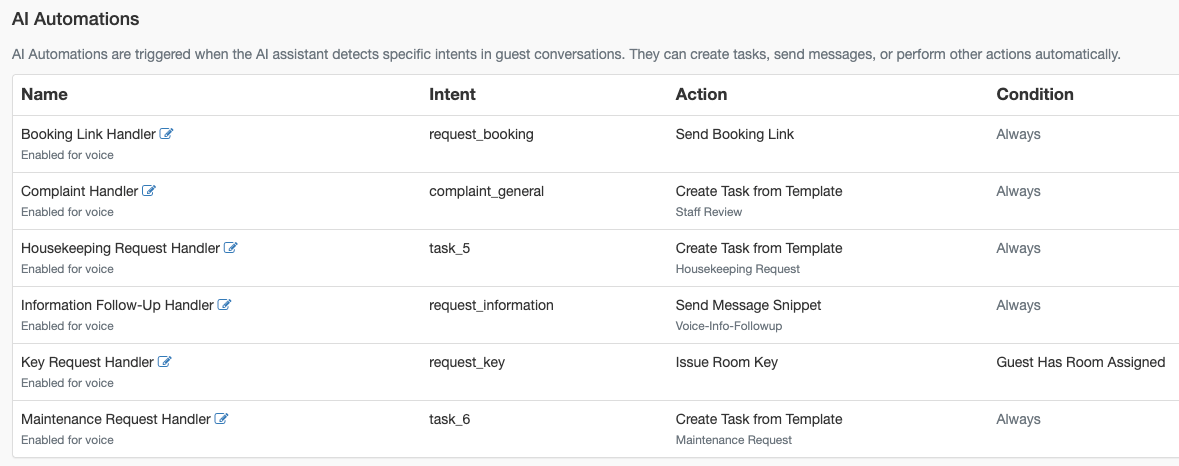
Deliver service at the speed of AI. HelloShift AI Automations now work seamlessly across all guest touchpoints — voice calls, messages, and digital interactions — ensuring requests are handled consistently and instantly.
Unified guest experience: AI responds across voice and messaging channels without breaking context.
Instant execution: Guest requests automatically trigger the right template tasks for your team.
Faster service delivery: Reduce delays by moving from request to action in seconds, not minutes.
👉 Learn more about AI Automations →
👉 Voice AI Assistant overview →
👉 Configure the AI Assistant →
👉 How template tasks work →
🔧 Fixes and Improvements
Authorize.Net payment integration
Authorize.Net now joins Stripe and Shift4, giving you more flexibility in how guest payments are processed.
👉 Set up Authorize.Net →
December 1st, 2025
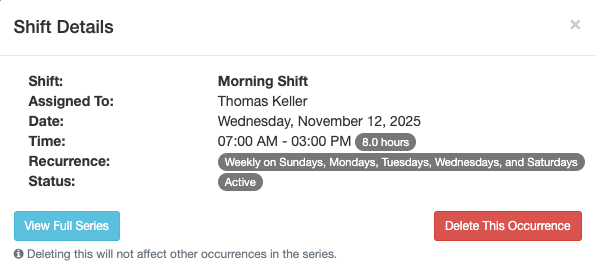
Easily manage your team’s work hours with HelloShift Staff Scheduling. Create, edit, and share shifts so everyone knows exactly when and where they’re needed.
Clear visibility: View and manage all staff schedules in one place.
Fewer mix-ups: Keep your front desk, housekeeping, and maintenance teams aligned.
Faster updates: Make schedule changes instantly and notify your team right away.
👉 Learn more about Staff Shift Scheduling →
🔧 Fixes and Improvements
Advanced Conditions for Precise Guest Targeting
Fine-tune your automations with advanced guest conditions for more targeted communication and smarter workflows.
👉 See how to use advanced conditions →