⚡ Checklists and Tasks That Create Themselves
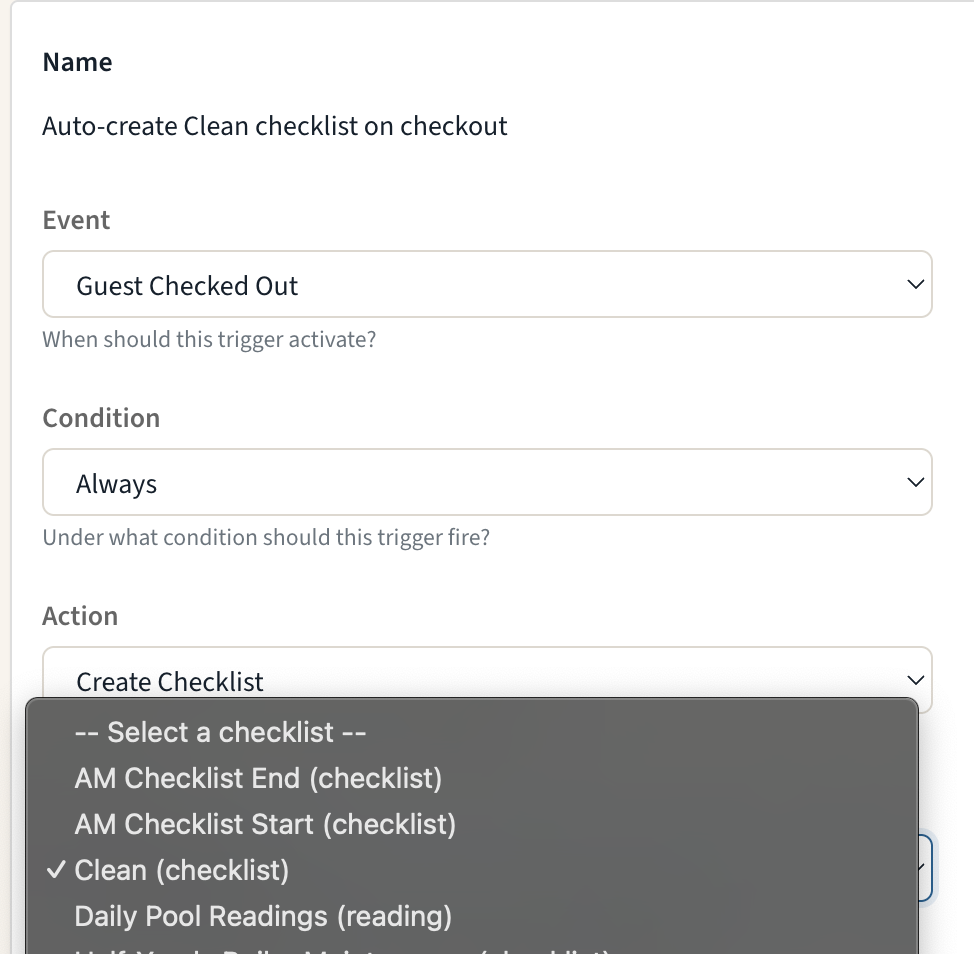
Stop recreating the same work by hand every time a guest arrives or departs. Triggers can now create checklists and tasks: pick a template, pick the moment — check-in, checkout, booking confirmed — and HelloShift generates the work automatically, tagged to the right room and linked to the right guest.
Create Checklist: Generate a checklist from any template the moment an event fires — a checkout-clean checklist for every departing room, ready before housekeeping walks the floor.
Create Task: Create a task (with its subtasks) from a task template, one per room, inheriting the room tag and guest link.
Smart by default: Multi-room reservations get one item per room, repeated PMS events don't create duplicates, and if a template is ever deleted the trigger switches itself off safely instead of failing silently.
👉 Learn more about Checklist & Task actions →
🔧 Fixes and Improvements
Merge Duplicate Guest Records
When the same guest shows up twice — a PMS double-send, a new phone number, a manually created record — admins can now merge the duplicate into the canonical profile right from the guest page. Notes, messages, tasks, stays, and history all move to the keeper, with a side-by-side review before anything is changed.
👉 Learn how to merge guests →OTA Guests Can Use the Kiosk Too
Guests who booked through an OTA can now self-check-in at the kiosk using the confirmation number from their OTA booking email — HelloShift matches it to the PMS reservation automatically on supported PMS integrations.
👉 Kiosk Self-Checkin →Your Cleaning Week, On Your Phone
The mobile app now has a weekly Room Calendar with a My/All filter, so cleaners and supervisors can see the whole week's room assignments at a glance — not just today's.
👉 Room Assignments →Shop, Arranged Your Way
Drag to reorder your shop items — the guest storefront follows your order — and give the store its own banner image under Settings > Brand.
👉 Shopping Feature →